NCCNovation Circuit Companion
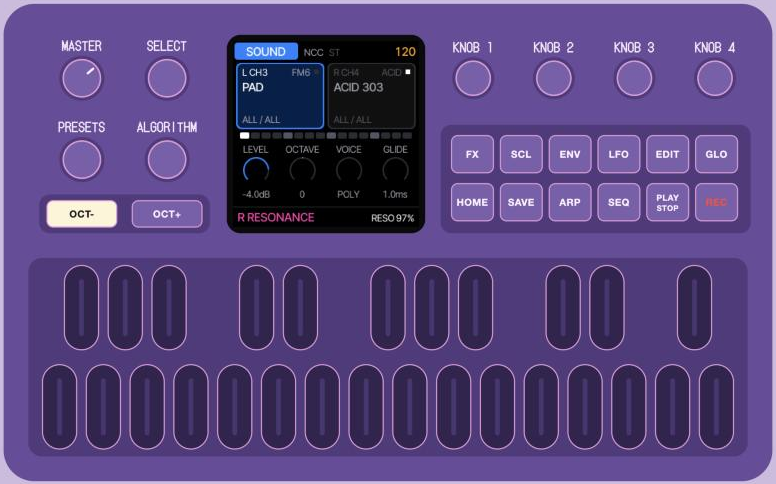
Free firmware that turns the M-VAVE FM-1 into a two-part synth for the Novation Circuit Tracks: every sound hands-on from the Circuit's eight knobs.
WhyThe Circuit's spare pair
The Circuit Tracks has two synth tracks inside, plus two MIDI tracks and two audio inputs that often sit unused. That spare pair is an open invitation: plug in a second instrument and give each MIDI track its own sound.
The FM-1 is small, cheap and runs Felucca, a brilliant multi-engine firmware, but Felucca is a whole groovebox. NCC strips it down to one job: being the Circuit's companion. Less to learn, more to play.
What it doesFeatures
Two parts, two tracks
Part L listens to the Circuit's MIDI 1 track, part R to MIDI 2. The Circuit plays the notes and sends the clock; NCC has no sequencer of its own.
Split to its two inputs
L comes out on the left, R on the right: mix, mute and effect each part on the Circuit itself.
The Circuit's knobs just work
Its eight macros are mapped to what their labels mean on every engine, smoothly, and the screen shows what each one does.
Sounds by role
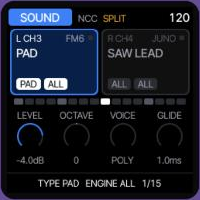
SELECT picks the category (bass, pad, lead, keys, pluck), ALGORITHM the engine, PRESETS the sound. 161 sounds, and your own.
Twelve engines
FM6, Juno, phase distortion, TRIO, ACID, physical models, granular, formant voices, LOFI, tonewheel organ, noise and samples. Every engine has eight Circuit macros.
Coming soon: drum loops
One-bar loops that always fit the Circuit's bar, opened by any note and chopped by its steps, with shuffle, reverse, stutter and crush on the knobs.
Built for jamming
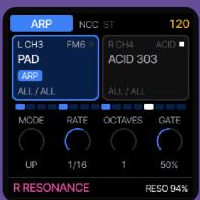
OCT- / OCT+ switch between your two sounds, an arp locked to the clock with HOLD, and STACK or whole-chord REPLACE Drone with a smooth 50 ms fade-out and 50 ms fade-in.
Dual sounds
SCL layers the existing L/R sounds from MIDI channel 3 or 4. Each keeps its own arp, Drone and Circuit knob controls.
Settings and sound editing
GLO opens channels, output, clock and performance settings. EDIT opens the selected sound's engine, envelopes, LFO and voice controls, including FM6 operators.
Dry sound defaults
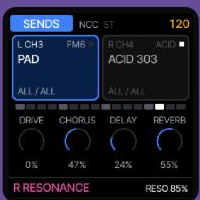
Every newly selected sound starts without delay or reverb. Turn the sends up whenever you want; both parts use the existing shared effect buses.
Effects one tap away
Sends, delay, reverb, chorus, an insert and performance effects on the keys, plus echo and reverb throws.
NCC Manager
A web page over USB: sounds on L and R, your own sounds, DX7 banks, backups and settings.
On the screenThe FM-1 in Circuit style
WatchSee it play
QuestionsFAQ
What do I need?
An M-VAVE FM-1, a Novation Circuit Tracks, a MIDI connection to the FM-1's TRS input or USB (with a USB MIDI host adapter or computer), and a stereo-to-two-mono cable into the Circuit's audio inputs.
Does it work without a Circuit Tracks?
Yes. The FM-1's keys play the parts, the arp runs on its own tempo, and any MIDI keyboard or sequencer on channels 3 and 4 works too. Or try it in your browser first.
How do I go back to the original firmware?
On the Install page, open “Return to official V15” and pick M-VAVE's FM-1.fwsc, or use M-VAVE's own updater. Your music is backed up first.
Which browser?
Chrome or Edge on a computer. The installer and the manager need Web MIDI with SysEx, which Safari and Firefox don't offer.
The arp runs out of time with the Circuit.
Press Stop and Start on the Circuit once: NCC counts its bar from the Circuit's Start. Since 0.3 it follows the Circuit's clock pulses, so it can't drift away afterwards.
Can I use my own sounds?
Yes: send DX7 banks to FM6 with the manager, and store your own sounds in the 32 user slots. Your own drum loops come with the LOOP engine, soon.
Is it safe?
It installs like M-VAVE's own updates, and the way back is always there. Still, installing firmware is at your own risk; if an install is cut off, run it again (hold OCT- while switching on for the update mode).
What is Felucca?
Felucca is Leo Kuroshita's open-source firmware for the FM-1. NCC is a fork of it, focused on being the Circuit Tracks' companion. Both are free software (GPL-3.0).
ReleasesWhat's new
0.4
Twelve engines, Dual sounds and smoother chord drones. Release identity: FM-1_704.
- Seven additional engines in the existing sound picker: PHYS, GRAIN, VOICE, LOFI, WHEEL, NOISE and SAMPLE. All eight Circuit Tracks macros have real audio destinations, with model-dependent LOFI controls and popup names.
- 46 new NCC patches; 161 built-in sounds in total. Expanded library capacity also fits full DX7/user/loop lists. The existing categories include physical percussion and noise textures; LOOP remains hidden.
- VOICE bandwidth scaling uses exact 32-bit divisions. NCC's NOISE renderer widens products that could overflow with colored shift-register sounds; the upstream engine submodule and non-NCC build are unchanged.
- Dual layers the existing L/R parts from one exclusive MIDI note source (CH3 or CH4), or the FM-1 keys. SCL turns Dual on/off, remembering CH3/CH4; GLO selects the source. Each part keeps its own sound, arp and controllers. Changing source fades current live notes.
- Drone has STACK and REPLACE modes per part. REPLACE holds a whole chord: add notes while any physical key is down; after all are released, the next strike fades and replaces the old chord. Sustain does not extend the gesture. Replacing a sounding drone now uses a smooth ~51 ms fade-out followed by a ~51 ms fade-in; the first strike remains direct and rapid gestures update the waiting chord. Repeated notes, MONO/LEGATO/UNISON and ARP HOLD retain their voice behavior. Select the mode on ARP page 2, KNOB 4; SEQ remains on/off.
- Every newly selected sound starts with delay/reverb sends at zero, including user sounds and DX7 bank voices. Sends can be turned up as usual. The other part, stored presets, shared bus settings and tails are preserved; complete project restore and undo restore their saved settings.
- GLO opens two settings pages with L/R MIDI channels, output, clock, BPM, Dual and both Drone controls.
- EDIT opens the focused part's engine parameters, envelopes, LFO, voices and chord settings, with JUNO filter and FM6 operator pages. Edits keep deliberately adjusted sends; changing an FM6 SLOT starts its sends at zero.
- The Manager offers Dual and Drone settings, with optional protocol trailers for compatibility with older firmware. Dual source and Drone modes persist in the existing project format; active Drone notes and on/off do not.
- The NCC Manager shows the correct tempo above 127 BPM.
- User sample reads use explicit XIP addressing, avoiding an invalid array access in memory checks while keeping the sample format and decoded audio unchanged.
- Host tests and firmware builds preserve failed exit codes and full logs; both NCC variants run with fatal UBSan checks (existing signed left shifts remain excluded pending a separate DSP audit).
0.3
- Clearer sound picking. SELECT is the category, ALGORITHM the engine, PRESETS the sound; all three stop at the ends instead of going round. The part's box shows its category and engine as two labels, the bottom line its place in the list, and while you turn you see where you're going (PRESETS: the sound's name before it loads).
- The LOOP engine is coming soon: it is left out of this version while it gets finished.
- Locked to the Circuit's bar. On the Circuit's clock, NCC now counts the bar in its clock pulses, so the arp can no longer drift off the Circuit over time. Press Stop and Start on the Circuit once after installing.
- A full 32-voice DX7 bank keeps its voice names and types after the FM-1 is switched off and on.
0.2
- Sounds by role, not by engine. SELECT picks the type (BASS, PAD, LEAD, KEYS, PLUCK, BEAT), ALGORITHM the engine (or ALL), PRESETS walks through what's left.
- 88 sounds, 30 of them new: keys, plucks, bells, pads, basses and leads.
- LOOP, a new engine: lo-fi one-bar drum loops that always fit the bar, opened by any note, with shuffle, reverse, stutter, crush, a DJ filter and pitch on the Circuit's knobs. Seven built-in loops, and your own.
- NCC Manager, a web page over USB: sounds on L and R, your own sounds, DX7 banks, drum loops, backups, settings.
- FX opens on SENDS; delay and reverb work in SPLIT; the Circuit's knobs 5 to 8 fixed; the knob popup shows what each knob does on each engine.
0.1
- The first release: two parts on the Circuit's MIDI 1 and MIDI 2 tracks, split output, the Circuit's eight knobs mapped per engine, five engines (FM6, JUNO, PHASE, TRIO, ACID), a clock-locked arp with HOLD, Drone, FX pages and throws.