NCC manual
This manual describes NCC 0.4 (FM-1_704): twelve engines, 161 sounds, Dual, chord REPLACE and GLO/EDIT pages. See CHANGELOG.md for changes from 0.3. Local development builds use FM-1_700.
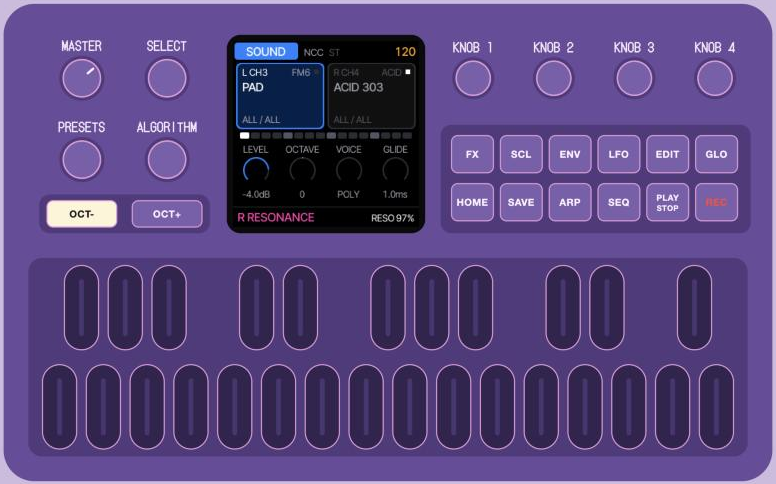
NCC (Novation Circuit Companion) turns the M-VAVE FM-1 into a two-part sound module for the Novation Circuit Tracks. The Circuit plays the notes and turns the knobs; the FM-1 makes the sounds and gives you the controls for playing live.
Hooking it up
MIDI. Send the Circuit Tracks' MIDI to the FM-1's TRS MIDI input, or use USB MIDI through a USB host adapter or a computer passing the MIDI on. NCC listens on:
| Circuit Tracks track | MIDI channel | FM-1 part |
|---|---|---|
| MIDI 1 | 3 | L (FM6 to start with) |
| MIDI 2 | 4 | R (JUNO to start with) |
Use the Circuit's factory MIDI template on both MIDI tracks: its 8 macro knobs then send exactly the CCs NCC expects (1, 2, 5, 11, 71, 74, 12, 13). NCC follows the Circuit's clock and Start/Stop over USB or TRS MIDI; choose the clock source on GLO > SETUP, KNOB 4 (USB is the default). With no clock coming, the arp runs at the FM-1's own BPM.
Audio. Run a stereo-to-2×mono Y-cable from the FM-1's output into the Circuit's audio inputs 1 and 2. By default part L is on the left channel only and part R on the right only, so each part arrives on its own Circuit input (see Split or stereo).
Then program notes on the Circuit's MIDI 1 and MIDI 2 tracks, press Play, and turn the Circuit's knobs.
The two parts
The FM-1 has two parts, L (blue) and R (pink). Each has its own engine, sound, arp, drone and sends.
- OCT- puts the focus on L, OCT+ on R. The FM-1's 4 knobs and its buttons act on the part in focus; its keys play that part, or both parts in Dual. This is the quick way to jump between your two sounds while jamming.
- The Circuit always plays both parts, whichever has the focus.
- Up to 8 voices are shared between the two parts.
Dual: play both sounds together
Press SCL (the small button beside FX) to turn Dual on/off. It remembers the last chosen source, CH3 or CH4; the first use selects CH3. Choose OFF/CH3/CH4 on GLO page 2, KNOB 1, or in the Manager's Settings. The top bar shows D3 or D4 while Dual is on, and the SCL LED stays lit.
| Dual | MIDI channel 3 notes | MIDI channel 4 notes | FM-1 keys |
|---|---|---|---|
| OFF | Normal routing (L by default) | Normal routing (R by default) | Part in focus |
| CH3 | Both L and R | Ignored | Both L and R |
| CH4 | Ignored | Both L and R | Both L and R |
Each part keeps its own sound, voice settings, arp, HOLD and Drone. For example, put an arp on L and a REPLACE drone on R: one Circuit MIDI track then plays the arp and updates the drone together. OCT- / OCT+ still choose which part the panel edits. Focus changes do not move held notes to another part.
Dual links notes only. Circuit macro knobs, pitchbend, aftertouch, sustain and Program Change keep their usual destinations: channel 3 controls L and channel 4 controls R in the default setup. Both sets of knobs keep working even when only one of those channels supplies the notes. Effects keep their existing shared buses and per-part sends. Dual uses the exact channel 3 or 4 chosen here; it does not overwrite the normal per-part MIDI channel settings.
Changing the Dual source or switching Dual on/off fades the current live notes and clears arp/Drone latches on both parts. Release and strike the keys again to use the new routing. Sound and knob settings stay in place.
The screen
- Top bar: the page (SOUND, ARP, or an FX page),
SPLITorST(stereo), and the tempo (amber when it follows the Circuit's clock).D3/D4identifies the active Dual note source. - The two part boxes: channel, engine and sound name of L and R, and two labels with the part's filters: its type and its engine (
PADALL). The part in focus is highlighted. A row of dots below shows the steps of the bar. - KNOB 1–4: what the FM-1's own four knobs do on this page, with their values.
- Bottom line: on the SOUND page, the focused part's type, engine and place in the list (
TYPE PAD ENGINE ALL 3/10); on the other pages a hint; or a popup. When you turn a Circuit knob it shows the Circuit's label and what it does on that engine with the live value, for exampleR FILTER FREQ CUTOFF 2.1kHz.
Sounds and engines
NCC puts the sounds of all twelve engines in one library, sorted by what you use them for: BASS, PAD, LEAD, KEYS, PLUCK, BEAT. You choose a sound by its role; the engine follows. On the SOUND page (press HOME), three knobs, one job each:
| Control | What it does |
|---|---|
| SELECT (knob) | The category: ALL, BASS, PAD, LEAD, KEYS, PLUCK, BEAT (OTHER for unclassified names). |
| ALGORITHM (knob) | The engine: ALL, FM6, JUNO, PHASE, TRIO, ACID, PHYS, GRAIN, VOICE, LOFI, WHEEL, NOISE, SAMPLE. |
| PRESETS (knob) | The sound, among those of that category and engine. It loads once you stop turning, so you can scroll freely. |
| KNOB 1–4 | LEVEL, OCTAVE, VOICE (poly / mono / legato ...), GLIDE |
- The three knobs stop at the ends: past the last category, engine or sound nothing happens (the bottom line says
(END),(FIRST)or(LAST)); turn back to go back. - While you turn, the screen shows where you're going in amber: the category or engine and how many sounds it has, or for PRESETS the name of the sound you'll land on and its place (
SOUND 3 / 10). - When you stop turning SELECT or ALGORITHM, the part keeps its sound if it fits the new filter; otherwise the first sound that fits loads, so you hear the change right away. Types or engines with no matching sound are skipped (ACID has no pads, for example).
- A sound from another engine switches the part to that engine automatically.
- Each part has its own filters, shown as the two labels at the bottom of its box.
- Your own sounds join in: user presets and a DX7 bank loaded into FM6 get their type from their name ("E.PIANO" is KEYS, "STRINGS" is PAD). Unknown names use their engine's default category on the seven extra engines; otherwise OTHER.
- The Juno chorus lives on FX > CHORUS (KNOB 3).
- Every newly loaded sound starts with DELAY and REVERB sends at zero, including user sounds and DX7 bank voices. Turn them up on FX > SENDS whenever you want. Loading another sound resets only that part's two sends; the other part keeps its settings and existing effect tails can finish. Stored presets and banks are kept intact.
There are 161 built-in sounds: 25 BASS, 40 PAD, 36 LEAD, 29 KEYS, 27 PLUCK and 4 BEAT. The seven extra engines bring 34 existing factory sounds and 46 new NCC patches. No external samples or DX7 banks are included. PHYS and GRAIN have up to three voices each per part; VOICE has four. The shared voice budget still applies when two parts play together.
More FM sounds: load a DX7 bank
FM6 plays real DX7 voices. Thousands of DX7 banks (.syx, 32 voices each) are around, for example the archive on Dave Benson's DX7 page. To load one, connect the FM-1 by USB, open Felucca's web editor in Chrome or Edge and import the .syx in its FM6 section. The bank's 32 voices then show up in NCC's library under FM6, sorted into types by their names ("E.PIANO 1" is KEYS, "SYN-BASS 1" is BASS, "STRINGS 1" is PAD, "TUB BELLS" is PLUCK).
The twelve engines:
| Engine | Character | Example sounds |
|---|---|---|
| FM6 | 6-operator FM in the style of the DX7: e-pianos, bells, basses, brass. Loads DX7 banks (via Felucca's web editor). | TINE EP, BELL, FM BASS, BRASS, PAD, MARIMBA |
| JUNO | Analog-style poly synth with a Juno-style chorus and drift, plus a set of Juno sounds. | JUNO STRINGS, JUNO PAD, JUNO EP, FUNK CLAV, HOUSE KEYS, DREAM PAD, HOOVER |
| PHASE | Casio CZ-style phase distortion: bright, glassy, a bit raw. | PD EP, DIGI PIANO, GLASS BELL, MALLET, PD BASS, FOLD LEAD |
| TRIO | Three oscillators and a multimode filter, in the spirit of the C64's SID chip. | CHIP BASS, WOBBLE BASS, CHIP KEYS, TOY PIANO, 8BIT PAD, CHIP LEAD |
| ACID | A 303-style bass: saw or square, a squelchy filter, accents on loud notes (velocity 100+), slides on overlapping notes. | ACID 303, SQUELCH, DEEP BASS, SOFT BASS, ACID LEAD, ACID PLUCK |
| PHYS | Physical models: modal bodies, strings, membranes and sympathetic strings. | STEEL PLUCK, BOWED PAD, HARP PLUCK, ROUND BASS, DEEP TOM |
| GRAIN | Granular textures from the built-in or uploaded sample material. | MIST PAD, FROST PAD, HALO PAD, DUST PLUCK, GLITCH LEAD |
| VOICE | Sung vowels with moving formants, buzz and breath. | AAH PAD, OOH PAD, AIR PAD, VOWEL LEAD, TALK BASS, VOCAL KEYS |
| LOFI | Low-bit chip waves, wave RAM and stepped envelopes. | PULSE BASS, TRI KEYS, RAM LEAD, CHIP PAD, STEP PLUCK |
| WHEEL | Tonewheel organ, drawbar registrations, percussion and rotor. | SOUL ORGAN, DUB ORGAN, GOSPEL KEYS, MELLOW ORGAN, ROCK ORGAN |
| NOISE | Analog noise, dust, shift registers and metallic patterns through a resonant filter. | WIND PAD, RAIN PAD, RADIO PAD, METAL PLUCK, BUZZ BASS |
| SAMPLE | Built-in piano, flute and sax, or uploaded sample sets. | SOFT PIANO, DUST PIANO, FLUTE PAD, SAX LEAD |
Coming soon: drum loops
A LOOP engine with lo-fi one-bar drum loops that always fit the Circuit's bar, opened by any note and chopped by the Circuit's steps, with shuffle, reverse, stutter and crush on the knobs, is in the works. It is left out of this version while it gets finished.
The Circuit's 8 knobs
Each Circuit macro knob is mapped to what its label means on that engine. Knob in the middle (64) = the sound as loaded; turn either way to move away from it. When you load a new sound, the knobs start again from the middle. Moves are smoothed, so sweeps don't zipper.
| Circuit knob | FM6 | JUNO | PHASE | TRIO | ACID |
|---|---|---|---|---|---|
| 1 OSCILLATOR | operator ratios | osc mix (sub level on SUB) | waveform | osc 2 interval | saw / square |
| 2 OSC MOD | feedback | osc 2 detune (sync on SYNC) | detune | pulse width + detune | accent amount |
| 3 AMP ENV | carrier envelope times | attack + release | attack + release | attack + release | decay + release |
| 4 FILTER ENV | modulator envelope | envelope to filter | envelope to DCW | envelope to filter | env mod + decay |
| 5 FILTER FREQ | brightness | cutoff | DCW (brightness) | cutoff | cutoff |
| 6 RESONANCE | detune | resonance | wave fold | resonance | resonance |
| 7 MODULATION | LFO on brightness + a little vibrato | LFO on filter + rate | LFO on DCW + rate | LFO on filter + rate | slide time |
| 8 FX | drive + chorus send | drive + chorus send | drive + chorus send | drive + chorus send | drive + delay send |
The extra engines use the same CCs: 1, 2, 5, 11, 71, 74, 12, 13, on their own part's channel.
| Circuit knob | PHYS | GRAIN | VOICE |
|---|---|---|---|
| 1 OSCILLATOR | structure / harmonics / chord | sample position | both vowels |
| 2 OSC MOD | strike position / sympathetic amount | grain size | buzz |
| 3 AMP ENV | attack + release | attack + release | attack + release |
| 4 FILTER ENV | envelope to brightness | envelope to tone | envelope to vowels |
| 5 FILTER FREQ | brightness | tone | formant shift |
| 6 RESONANCE | ringing time | grain density | formant Q |
| 7 MODULATION | bow / bend / buzz | random + spread | LFO to vowels + rate |
| 8 FX | drive + chorus send | drive + chorus send | drive + chorus send |
| Circuit knob | LOFI | WHEEL | NOISE | SAMPLE |
|---|---|---|---|---|
| 1 OSCILLATOR | waveform | drawbar registration | color | tune |
| 2 OSC MOD | duty / wave RAM; sweep on triangle, saw and noise | sub drawbars | density / register | bit reduction |
| 3 AMP ENV | attack + release; STEP: release | attack + release | attack + release | attack + release |
| 4 FILTER ENV | envelope to tone | percussion | envelope to filter | envelope to tone |
| 5 FILTER FREQ | tone | top drawbars | cutoff | cutoff |
| 6 RESONANCE | crush / STEP decay | body drawbars | resonance | drive |
| 7 MODULATION | vibrato | rotor OFF/SLOW/FAST | LFO to filter + rate | vibrato + rate |
| 8 FX | drive + chorus send | organ drive | drive + chorus send | chorus send |
The popup names the actual function, including model-specific controls. Choose models, chips and sample sources on EDIT. A source-dependent control works when there is source material: upload a sample before selecting an empty user slot. SAMPLE's held notes keep their original sample zone; tuning and tone remain live. Grain changes can take effect on newly spawned grains; percussion and excitation also affect the next strike. Filter envelopes need an envelope shape with movement; a fully open tone control can mask further brightening.
If you change a value on the FM-1 itself while a Circuit knob is turned, your FM-1 setting stays, and the Circuit knob keeps working on top of it.
Arp and HOLD
- ARP switches the arp on for the part in focus and opens the ARP page. Press ARP again on that page to switch it off.
- KNOB 1–4: MODE (UP, DN, UPDN, RND, ORD, CHORD and more), RATE (1/4 to 1/32, triplets), OCTAVES, GATE. Turn SELECT for page 2: SWING, PROB, ORDER, DRONE (STACK / REPLACE).
- The arp is always locked to the Circuit's clock. A new chord starts on the next step of the grid, so it stays in time.
- REC = HOLD: the arp keeps playing after you let go. A new chord replaces the held one; press REC again to release.
- The Circuit's Stop stops the arp.
Drone
SEQ switches Drone on/off for the part in focus. Choose its mode with KNOB 4 on ARP page 2 (turn SELECT on the ARP page), or in the Manager's Settings:
| Mode | New note | Same note again | Badge |
|---|---|---|---|
| STACK | Adds to the held notes, as before | Removes that note from the drone | DR+ |
| REPLACE | Adds notes to the current chord while keys remain down; the next gesture replaces the old chord | Retriggers it | DR1 |
Notes keep sounding after you let go. In REPLACE, play a chord and release all its keys: the whole chord keeps droning. The next strike fades that old chord and starts a new one. You can add notes for as long as any physical key is still down, with no time limit. This works from MIDI and the FM-1 keys, including Dual and mapped CHORD shapes. The sustain pedal does not keep a gesture open once all physical keys are released.
Use VOICE = POLY for several simultaneous drone tones (SOUND page, KNOB 3, or EDIT > VOICE). MONO, LEGATO and UNISON keep their voice settings. When replacing a sounding chord, REPLACE fades it out over about 50 ms, then fades the new chord in over about 50 ms, even with a long RELEASE. The first strike starts directly. Rapid new gestures update the waiting chord without restarting the fade-out; old note-offs do not stop the new chord. An existing delay/reverb tail may still finish.
With ARP on, Drone holds the arp's input notes. HOLD (H on screen) and the arp's rate remain independent per part. Changing STACK/REPLACE takes effect on the next strike. Press SEQ again to release the drone; physically held keys keep playing until released. The Circuit's Stop clears the held drone notes too, leaving Drone enabled for the next strikes.
Settings (GLO)
Press GLO to open the settings. Turn SELECT to change page, or tap GLO again to cycle the two pages. HOME returns to SOUND. These are the same performance settings offered in the Manager:
| Page | KNOB 1 | KNOB 2 | KNOB 3 | KNOB 4 |
|---|---|---|---|---|
| SETUP | L MIDI channel (1–16 / OMNI / OFF) | R MIDI channel | Output SPLIT / STEREO | Clock INT / USB / TRS |
| SETUP 2 | Dual OFF / CH3 / CH4 | Internal BPM | L Drone OFF / STACK / REPLACE | R Drone OFF / STACK / REPLACE |
The top bar shows the current tempo; BPM on SETUP 2 sets the internal tempo. External clock keeps its usual priority. SCL switches Dual on/off from any page. Turning it off remembers the source for the next press. Each Drone control also remembers its mode while off. These controls affect the same settings as the panel's SEQ and ARP Drone controls.
Editing sounds (EDIT)
Press EDIT to open the focused part's sound parameters. SELECT changes edit page; further EDIT presses also step through them. OCT- / OCT+ select L / R to edit, including while Dual plays both. HOME returns to SOUND. The four knobs show the engine's real parameter names and ranges. Editing keeps any delay/reverb you have turned up.
| Page | Parameters |
|---|---|
| ENGINE 1 / 2 | The engine's eight parameters: oscillators, modulation, filter and other engine-specific values |
| AMP ENV | Attack, decay, sustain, release (engines with the common envelope) |
| ENV DEST | Envelope to filter, pitch, shape; envelope sync |
| LFO / LFO DEST / LFO SYNC | Rate, waveform, phase, fade; pitch/filter/shape/amplitude amounts; sync, trigger, polarity |
| VOICE / VOICE 2 | Poly/mono/legato/unison, glide, priority; allocation, detune, pan, spread |
| CHORD | Chord shape, voicing, root, scale |
| FILTER (JUNO) | Filter type, cutoff, resonance, key tracking |
| OPERATOR (FM6) | Operator 1–6, ratio/fixed frequency, fine tuning, output level |
| OP ENV (FM6) | Operator, envelope stage, rate, level |
| OP MODE (FM6) | Operator, ratio/fixed mode, detune, velocity response |
FM6 uses its operator envelopes, so it shows the operator pages instead of the common AMP ENV / ENV DEST pages. Its operator edits turn the patch into SLOT OWN and are saved with projects/user sounds. Selecting a different FM6 SLOT on ENGINE 2 loads a sound and starts its delay/reverb sends at zero, like other sound selections.
Effects (FX)
Tap FX to open the effects. Each further tap of FX (or a turn of SELECT) goes to the next page; the tap after the last page closes FX. HOME or ARP close it at once.
| Page | KNOB 1 | KNOB 2 | KNOB 3 | KNOB 4 |
|---|---|---|---|---|
| SENDS (part in focus) | DRIVE | CHORUS send | DELAY send | REVERB send |
| DELAY | TIME (synced) | FEEDBACK | COLOR | MIX |
| REVERB | TYPE (ROOM / SPRING / HALL) | SIZE | DAMP | reverb SEND of the part |
| CHORUS | RATE | DEPTH | JUNO chorus of the part | DRIFT of the part |
| INSERT (part in focus) | TYPE (SOFT, HARD, FOLD, FUZZ, CRUSH, PHASER, FLANGER, CHORUS) | A | B | C (named per type) |
| PERFORM | FILTER | CRUSH | THROW | DEPTH |
While FX is open, the white keys play Felucca's PERFORM effects instead of notes: beat repeats (1/8, 1/16, 1/32), reverse, low-pass and high-pass sweeps, tape stop, freeze, octave shimmer, flanger, phaser and throws. Each effect lasts as long as you hold its key. The PERFORM page shows which key does what.
Throws, on every page: hold ENV for an echo throw, hold LFO for a reverb throw.
Split or stereo
- SPLIT (the default): part L only on the left output, part R only on the right. The dry sounds stay fully apart, so each part goes to its own Circuit input. The delay, reverb and chorus are shared by both parts, so their tails come out on both sides.
- STEREO: both parts in stereo on both outputs, for headphones or a single input.
- GLO + SEQ toggles between them; the top bar shows
SPLITorST.
Button cheat sheet
| Button / knob | Action |
|---|---|
| OCT- / OCT+ | Focus on part L / part R |
| HOME | SOUND page |
| PRESETS | Choose the part's sound (within the filters) |
| SELECT | SOUND page: type filter. ARP / FX: next page |
| ALGORITHM | Engine filter |
| ARP | Arp on + ARP page / off |
| REC | Arp HOLD |
| SEQ | Drone |
| GLO + SEQ | SPLIT ↔ STEREO |
| SCL | Dual on/off, remembering CH3 / CH4 |
| GLO | Settings (SELECT / GLO: page) |
| EDIT | Edit the focused sound (SELECT / EDIT: page) |
| ARP page 2, KNOB 4 | Drone STACK / REPLACE |
| FX | Open effects, next page, close |
| ENV (hold) | Echo throw |
| LFO (hold) | Reverb throw |
| Keys | Play the part in focus, or both in Dual (with FX open: PERFORM effects) |
Your parts, engines, sounds, effect settings, Dual source and Drone mode choices are kept by Felucca's autosave. Drone's on/off state and sounding notes are not restored after power-on. Restoring a complete project or undoing a sound change restores its saved effect settings; the zero-send rule applies when selecting a new sound.
NCC Manager (web page)
A web page to manage the FM-1 from your computer, over USB (Chrome or Edge). Start it with:
sh tools/ncc_manager.shIt opens on localhost (Web MIDI only works there or on https). Press Connect. The tabs:
- Parts: what L and R play, their channel and filters.
- Sounds: the whole library by type and engine, with a search box. L / R puts a sound on that part.
- My sounds: the 32 user preset slots. Store what L or R plays now, load, rename, erase, and save all of them to a file (or load such a file back).
- DX7 bank: drop a 32-voice
.syx, see its voices and their types, and send it to FM6. - Backup: everything on the FM-1 in one file, and back.
- Settings: L's and R's MIDI channel, SPLIT or STEREO, the clock source, Dual OFF/CH3/CH4 and each part's Drone OFF/STACK/REPLACE. Drone remembers its mode while switched off. The new controls are disabled on older firmware.
No FM-1 at hand? http://localhost:8768/?mock=1 simulates one with example sounds from all twelve engines. The demo list is a small subset of the full firmware library.
Installing
Installing firmware is at your own risk, but the way back is easy: the web installer's Return to official V15, or M-VAVE's own updater.
The easy way: open the web installer in Chrome or Edge, connect the FM-1 by USB (directly, a data cable) and press Install.
The command line:
- Get the package:
ncc-0.4.fwsc(or the newestncc-X.Y.fwsc) from the Releases page, or build it yourself (FELUCCA_LIVEUI=1 ./build.sh, see BUILDING.md). - Connect the FM-1 by USB and install with the command-line installer (Python 3 with
pip3 install mido python-rtmidi):python3 tools/fm1_install.py ncc-0.4.fwsc
- The FM-1 restarts into NCC (identity
FM-1_704for release 0.4; NCC usesFM-1_7XY). Check withpython3 tools/fm1_install.py --info.
If an install is ever cut off, run the same command again, or hold OCT- while switching on to reach the updater.
Tips
- Put a pad on L with Drone on, and an ACID line on R. Ride R's FILTER FREQ and RESONANCE on the Circuit while the pad rings.
- Tap FX once and you're on SENDS: a quick way to add delay to just one part.
- Hold ENV on the last beat before a break for an echo throw.
- Set SELECT to PAD and leave ALGORITHM on ALL: PRESETS then walks through every pad of every engine.
- Load your own DX7 bank into FM6 with Felucca's web editor: its voices appear in the library by type.
- No Circuit at hand?
DEMO=1 sh tools/ncc_demo.shbuilds the browser emulator with a built-in player.