Manual
SY1 is a polysynth for the M-VAVE FM-1 that plays Synth1 patches. This manual explains the screen, the pages, how to get patches into the FM-1, and MIDI. Version 0.5.0 has a new factory bank: 256 community presets, a cross-section of all 13 sound categories, the same categories the Patch Manager uses. It plays two sounds at once in bitimbral mode (layered, split, or on two MIDI channels), keeps everything on GLOBAL out of the patch, and has a Patch Manager that arranges all 1,024 user slots and the NORD, GREEN LED and GREEN LCD display styles.
1Install
To try it first, open the emulator. It runs the same code in your browser, with sound.
To install, open the installer in Chrome or Edge with the FM-1 connected by USB, and follow it. Back up what you want to keep from the firmware you have now: SY1 keeps its settings and patches in the same part of the flash, and overwrites what another firmware left there. The installer can put M-VAVE's own firmware back.
After installation, this release reports the full USB identity FM-1_51000301.
2The screen
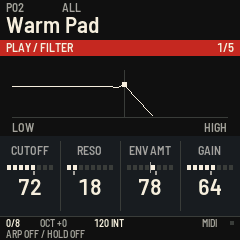
The patch number, browsing category and patch name stay at the top. EDIT and the SAVE light mean that the patch differs from the saved version. Turning every value and the patch category back to their saved settings clears EDIT again. Short save and error messages appear in the red strip without hiding the patch name.
The red strip names the current subpage and its position, such as FILTER / MAIN 1/2. The large diagram below it shows that section's settings. Four fixed columns correspond left to right to KNOB1–KNOB4. The last encoder you turn lights amber; a small grey notch marks its saved value. A new subpage starts without encoder focus. Switches and choices use separate positions; a centred parameter has a centre mark.
Filter shapes, oscillator waveforms and effect diagrams are schematic setting views. The envelope's moving point follows the most recently started voice through its release, the LFO point follows its actual phase/value, and the arp shows the current step/note. Random LFOs show recent values. These are not audio oscilloscopes.
Values use meaningful units where the engine supplies a reliable conversion: attack in ms or s, pitch in semitones and cents, sustain in percent and LFO speed in Hz or exact fractions of a beat. D.TAU, R.TAU and M.TAU are decay and release time constants, not the total duration of a note. Pulse width shows the duty of the low part (50% at its maximum). Other values keep their Synth1 numbers. GLO's DIAGNOSTIC subpage (4/4) shows CPU, peak CPU, voice-limit events and the raw value of the last edited Synth1 parameter. Its four encoders are read-only.
The bottom always shows active/max voices, octave, tempo and its source: INT for internal, EXT for MIDI clock. MIDI lights briefly when a note arrives. The second line explicitly shows ARP ON/OFF, HOLD ON/OFF or DRONE / STACK or REPLACE. LIMIT means that the CPU has reduced the voice limit during this session.
Choosing a display style
On GLO → DISPLAY (3/4), turn KNOB1 to choose NORD, GREEN (LED) or LCD. The change is immediate. NORD keeps the red section strip, ivory text and amber focus. GREEN LED uses a dark green background, uppercase 5×7 pixel lettering and seven-segment numerals. GREEN LCD reverses the contrast with dark characters and graphics on a soft green background; the focused control gets a lighter panel and dark underline. Units, patch names, saved-value marks, encoder focus, graphs, playing status and live envelope/LFO feedback remain available in all three styles. The screen reader keeps the original text and announces the style choice.
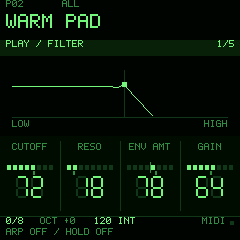
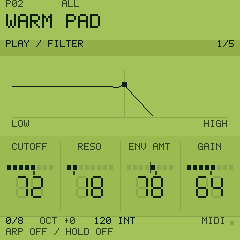
Compare every page in the screen gallery: 33 subpages in all three styles.
This is a global preference, separate from the sound. It is automatically saved when the synth is idle; existing patch edits and imported banks are preserved. Upgrading from older 12-byte settings keeps the selected patch, octave, voice limit, tempo, category and drone preference, and starts in NORD.
3Patches
Turn ALGORITHM to choose a category, and PRESETS for the next or previous patch within it. Both wrap at the ends. Empty categories are skipped. ALL contains every patch; USER contains every patch in the user bank. FACTORY contains the 256 bundled community presets. The 13 sound categories are the Patch Manager's, in its order: BASS, PAD, LEAD, KEYS, PLUCK, ARP, DRUMS, STRINGS, BRASS, ORGAN, VOCAL, FX and OTHER. DRUMS covers drums and percussion, BRASS brass and woodwinds, VOCAL voices and choirs. ALGORITHM steps ALL, the 13, USER, FACTORY.
256 community presets are ready from the first boot, numbered F001–F256. From ALL, turn ALGORITHM left once to FACTORY, then use PRESETS. No import or USB transfer is needed.
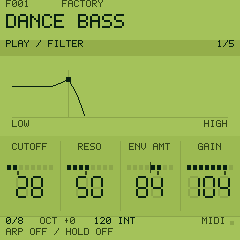
Each factory preset has a category, and the bank is a cross-section of all 13: 22 each of Bass, Pad, Lead, Keys, Pluck, Arp, Drums and Strings, 21 each of Brass, Organ and FX, 9 Vocal and 8 Other (chords, hits and poly synths). They are numbered in that order: F001–F022 are basses, F023–F044 pads, and so on. A preset is only included when its sound agrees with the category its name gives: a pad has a slow or long envelope, a pluck a short decay, a drum a hit that dies away, an organ a note held at full level, an arpeggio the arpeggiator on. At most two presets come from one name series (VOICES 001, 002 ...), so Vocal has fewer: the library has few distinct voices. 211 of the 256 were not in the 0.4 factory bank. Turn ALGORITHM to a category to browse just those, factory and your own.
These presets live in program flash and leave the 1,024 user slots available. Existing user slots, stored selections and MIDI program numbers are preserved when upgrading.
P01 to P08 are the eight original built-in sounds. Your own patches are numbered 001 to 1024; empty slots are skipped. From the manager, the slot count always refers to these user slots.
SAVE keeps the patch with your changes. An original or factory patch is saved as a copy to the first free user slot, keeping the built-in original. REC puts the patch back as it was saved and releases hold/drone. Changing patches also releases hold/drone.
Imported patches are categorized from their names, ignoring case (for example, "deep bass", "Warm Pad" and "FM Bell"). Unrecognized names go under OTHER. To correct a category, use HOME (Play), SELECT to its last row (PLAY / SPREAD, 5/5), then KNOB4 (CAT), and SAVE: the category is stored with the patch. Editing CAT returns the browser to ALL. The Drone mode, which is not part of the patch, is on GLO → PART, KNOB4. MIDI program changes select their original patch number; if necessary the browser returns to ALL.
4Pages and editing
| Button | Page | What is on it |
|---|---|---|
| HOME | Play | Filter frequency, resonance and amount, gain; portamento, pan, tempo, voices; poly, mono or legato, bend range, unison, polyphony and the patch's category |
| EDIT | Osc | Both oscillators, mix, pulse width, sync, ring, FM, detune, the sub, the mod envelope |
| SEL | Filter | Type, frequency, resonance, envelope amount, keyboard tracking, saturation |
| ENV | Env | The amp envelope, the filter envelope, gain and velocity |
| LFO | LFO | Both LFOs: destination, wave, speed, depth, tempo and key sync |
| FX | Effects | The effect, the equalizer, the delay and the chorus |
| Hold ARP 0.5 s | Arp | The arpeggiator: on, type, range, beat, gate, tempo; Drone mode |
| GLO | Global | Patch randomizer, part voice limit and Drone mode, tempo, bitimbral mode, output and channels, display style, diagnostics |
Press a page's button again for its next subpage (hold again for ARP), or turn SELECT to choose one. Each page remembers its last subpage during the session. KNOB1 to KNOB4 change the four displayed values; a fast turn goes further. This navigation memory is not written to flash. A restart begins on HOME.
On GLO → PART (1/4), turn KNOB3 (RANDOM) to audition eight variations of the active sound. Each click selects another oscillator mix, pulse width, filter and envelope variation around the same starting patch, including your unsaved edits. Turn back to a number to hear it again, or all the way left to BASE to restore your starting sound. Both parts have their own variations. Editing a sound parameter by hand starts a new set from that edit. Press SAVE to keep the current sound as a patch.
The screen reader announces the subpage and the same displayed value/unit when you turn a knob. Read whole screen also includes the four controls and the current playing state. Animations do not generate spoken updates.
PLAY silences every note. OCT- and OCT+ move the keys by an octave. Pressed together they switch between standard and bitimbral (below).
Arp, HOLD and Drone
- Tap ARP: switch the arpeggiator on or off from any page. Its light shows on/off, including on the Arp page. Hold ARP for half a second to open its settings without toggling it. Hold again to advance the row.
- SEQ with arp on: toggle HOLD. Notes keep arpeggiating after key-up. Notes added while any key is down belong to the same chord; after all keys are up, the next gesture replaces it.
- SEQ with arp off: toggle Drone. In STACK, notes accumulate; play a droning note again to remove it. In REPLACE, the next gesture after all keys are up replaces the previous chord. The old chord uses its release envelope, and the new chord its attack; available polyphony still limits overlapping voices.
- Change Drone mode: Arp row 2, KNOB3, or Voice row 4, KNOB4. The setting is remembered.
- Switching ARP while SEQ is lit changes the held chord between arpeggiation and Drone.
- Toggle SEQ off to release latched notes; physical keys and the sustain pedal keep their own notes. PLAY, MIDI Stop, MIDI All Notes Off and MIDI All Sound Off clear the latch. Hold/drone never resumes at power-on.
These controls work with the FM-1 keys and incoming MIDI. A Drone keeps notes held, so a patch with zero amp sustain still decays naturally. There is no sequencer or note recording.
VOICES, on the Play and Global pages, is the most voices SY1 plays at once, 1 to 16. The FM-1 manages about seven. When the processor runs out of time, SY1 lowers it by one and says CPU FULL.
Bitimbral: two sounds at once
SY1 has two modes. Standard is one sound on every MIDI channel. Bitimbral is two parts, L and R, each with its own patch, arpeggiator, HOLD/Drone and effects: two synths in one FM-1. Use it to:
- layer two patches, so every note plays both (a pad under a bell, a bass doubled by a pluck): output DOUBLE;
- split two sounds to the two outputs, a bass on one mixer channel and a lead on the other: output SPLIT;
- play two tracks of a DAW, a groovebox or a sequencer, each on its own MIDI channel: output STEREO or SPLIT;
- keep a drone or an arpeggio going on one part while you play the other from the FM-1's keys.
Nothing beyond MIDI is needed. A Novation Circuit Tracks fits especially well: its two MIDI tracks, its two audio inputs and its eight macro knobs map straight onto the parts (below).
| Control | What it does |
|---|---|
| OCT- and OCT+ together | Standard or bitimbral |
| OCT- (tap, in bitimbral) | The panel and the keys on part L. OCT- lights, PLAY is green |
| OCT+ (tap, in bitimbral) | The panel and the keys on part R. OCT+ lights, PLAY is red |
| OCT- or OCT+ held half a second (in bitimbral) | The octave |
| GLO → BITIMBRAL (2/4), KNOB1 | MODE: standard or bitimbral |
| GLO → BITIMBRAL, KNOB2 | OUTPUT: SPLIT, STEREO or DOUBLE |
| GLO → BITIMBRAL, KNOB3 and KNOB4 | The MIDI channels of L and R (3 and 4 to begin with) |
The three outputs:
- SPLIT: part L on the left output only, part R on the right only, each in mono, effects included. With a stereo-to-two-mono cable each part reaches its own input of the Circuit, to mix and mute there.
- STEREO: both parts in stereo on both outputs.
- DOUBLE: every note plays both parts at once, in stereo: two patches layered.
Everything the panel does (PRESETS, ALGORITHM, the pages, ARP, SEQ, SAVE, REC) acts on the part it is on; the top of the screen shows L or R and the output. The parts are two synths: each keeps its own patch, category, octave, VOICES limit, Drone mode and the page the panel was on. Only the tempo is shared. Each part plays up to VOICES voices: part R is rendered by the FM-1's second processor core, so a second sound does not take voices from the first. On an FM-1 whose second core does not run, the two parts share one core and the overload protection lowers VOICES as usual. Part R's delay line is half as long as part L's: an echo longer than 0.37 s plays at half its time. The mode, the output, the channels and both patches are remembered. Changing the mode, the output or a channel stops the notes.
The Circuit's eight knobs. In bitimbral, with the Circuit Tracks' factory MIDI template on its MIDI tracks, each macro knob moves what its label says on the part of its channel. The knob in the middle is the patch as it is; turning either way adds to it or takes from it, and a new patch starts from the middle again. The screen names the knob, what it moves and the value.
| Circuit knob | Controller | SY1 |
|---|---|---|
| 1 OSCILLATOR | 1 | The balance of the two oscillators |
| 2 OSC MOD | 2 | Detune: the detuned copies, and oscillator 2 a little |
| 3 AMP ENV | 5 | Amp release and decay (the attack stays) |
| 4 FILTER ENV | 11 | Filter envelope amount, and a little of its decay |
| 5 FILTER FREQ | 12 | Cutoff |
| 6 RESONANCE | 13 | Resonance |
| 7 MODULATION | 71 | LFO 1's depth (above the middle LFO 1 is switched on) |
| 8 FX | 74 | The delay's level (above the middle the delay is switched on) |
These numbers follow the Circuit Tracks' default MIDI template. Versions through 0.4.2 assigned knobs 5–8 in the wrong order. Recorded knob movements on the Circuit are replayed with every pattern loop, including after changing its MIDI template; they keep changing the sound until cleared.
In standard mode these controllers do what the patch routes them to, as before.
5Loading your own patches
The Patch Manager on SY1's website has two halves: the Library on the left, with 3,174 community sounds in 27 banks, and My FM-1 on the right, with your 1,024 user slots. Everything you do there is staged in the browser first. Nothing reaches the FM-1 until you press Sync.
Finding sounds. Search by name or bank, pick a bank, and narrow by character with the coloured chips (the counts follow your search). Character is inferred from names, so it is a starting point rather than a guarantee. ★ Favourites are remembered in this browser; Not on my FM-1 hides what you already have, and a green slot number beside a sound shows where it already lives. Click ▶ to hear a sound: the browser synth switches on inside the page and plays a short phrase. With the list focused, ↑ ↓ move through it and Space plays. Preview uses the separate emulator; it never sends patches to USB hardware.
To bring your own collection, use Import, or drop .sy1 files, folders and ZIPs on the page. ZIPs containing other bank ZIPs work too. Even the complete supplied collection (175 banks / 16,698 patch entries) can be browsed locally. Imports remain in this tab until it is closed or reloaded and are not uploaded.
Connecting. Connect the FM-1 by USB, open the manager in Chrome or Edge, press Connect, and allow MIDI with SysEx. The manager reads every user slot whole, so it can move a patch you made on the FM-1 as easily as one from the library. Sounds you added before connecting wait, and go after your last patch.
Arranging your FM-1. The map shows all 1,024 slots, one square each, coloured by character; click a square to jump to that slot. In the list below it you can:
- drag sounds from the library onto a slot, or select them and press Add to FM-1;
- drag slots to reorder them (later patches move down into the next gap), or select some and use Move to slot;
- double-click a name to rename it (23 characters), and choose its character, which the FM-1 uses for category browsing;
- remove patches with ✕, Delete, or Arrange → Remove everything;
- tidy up with Arrange: close gaps, group by character, sort A–Z or group by bank.
Shift-click and Ctrl-click select several; Ctrl+A selects all, Ctrl+Z undoes, / jumps to the search box. Show empty slots and Changes only filter the list.
Syncing. The bar at the bottom says what will change: added, moved, edited and removed patches, and how many slots will be written. Undo and Discard all cost nothing, because the FM-1 has not been touched yet. Sync writes slot by slot, each acknowledged, with progress; Stop stops between acknowledged writes and leaves the rest staged. Removing patches asks for confirmation first. If a slot is not confirmed, press Read again before retrying. The factory presets and the eight original sounds are never affected. Turn PRESETS past the built-in patches to play your slots.
Sets. A set is a saved layout of all your slots, kept in this browser: one for the stage, one for the studio. Load a set to stage it, then sync. Before a sync that moves, changes or removes patches, the manager saves the old layout as Auto-backup before last sync. Export a set as a file to keep a backup outside the browser, and import it again later.
Bitimbral in the manager. With an FM-1 connected, the strip under its name switches between Standard and Bitimbral and, in bitimbral, chooses the output (Split, Stereo, Double); it also shows each part's MIDI channel and the slot it plays. Each slot in the list has an L and an R button (one ▶ in standard mode) that make the FM-1 play that slot on that part straight away, with any of the 1,024 slots. The map rings part L's slot in green and part R's in red, as the FM-1's PLAY light shows the part. A slot you have only staged plays after you sync it.
To find two sounds that work together, press L beside a sound in the library: it becomes part L. Every ▶ after that plays the other sound as part R together with it, a bass line on L under chords on R, as on a Circuit. Add pair stages both side by side; after syncing, press L and R on the two slots. ✕ ends the pairing.
An FM-1 running SY1 0.3.1 or earlier can only report patch names. The manager then still adds and removes sounds, but reordering, renaming, Arrange and Sets need a newer SY1.
The collection comes from Internet Archive; its metadata credits the compilation to techno-addicts. Our count of the supplied ZIP is 175 banks / 16,698 patch entries.
Use the manager's Factory filter to preview the included sounds. The downloadable selection contains the original patch files and complete original readmes.
Each hosted bank keeps its original ZIP, readme, author credits and distribution terms in About this bank. These presets have their authors' own terms, separately from the code's MIT license. The full supplied collection contains banks that restrict redistribution; those can be imported locally but are not hosted. Patches from older Synth1 versions are converted as Synth1 itself converts them.
6MIDI
MIDI comes in over USB and the TRS jack. SY1 plays notes with velocity, pitch bend, the sustain pedal and channel pressure. The modulation wheel and other controllers do what the patch routes them to. A program change selects the patch of that number. A MIDI clock sets the tempo of the arpeggiator, the delay and the LFOs that are synced to the tempo. After two seconds without clock ticks SY1 returns to the internal tempo. MIDI Stop releases all notes and disables hold/drone. With a clock coming in, the arpeggiator steps on the clock itself, counted from MIDI Start: it stays on the sequencer's grid, a new chord begins on the next step, and Start plays the pattern from its top.
In standard mode SY1 listens on every channel. In bitimbral, part L listens on channel 3 and part R on channel 4 (the Circuit Tracks' MIDI 1 and MIDI 2; GLO → BITIMBRAL changes them) and other channels are ignored. In DOUBLE the notes of either channel play both parts; controllers, pitch bend and program changes stay with their part.
The FM-1's own keys also go out as notes over USB.
7What differs from Synth1
SY1 follows Synth1's structure and its measured parameter laws, but it is a lighter engine made for the FM-1, not an exact copy:
- The LPDL filter plays as the 24 dB filter, and the effect a.d.1 uses a.d.2's curve.
- The delay is 0.74 seconds a side at most; a longer time plays an octave shorter.
- With the delay and the chorus both on, the echoes also reach the output directly.
- Osc1's detune does not thicken the sub.
- It plays about seven voices, where Synth1 plays up to 32.
8Troubleshooting
- The sound breaks up on big chords. Lower VOICES on the Voice page.
- The Patch Manager finds no FM-1. Use Chrome or Edge, allow MIDI for the page, and check the USB cable carries data. Close other programs that hold the FM-1's MIDI port.
- A patch sounds different from Synth1. See section 7; reports with the patch are welcome at the source's issue tracker.
- To go back to another firmware, use that firmware's installer, or SY1's installer for M-VAVE's own.